- Unseen Liminality is an unusual bit of Roblox horror, in that it actually got me once or twice. I’ve put some hours into this Kane Pixels’ Backrooms-themed horror title recently, and while it’s in its early stages of development, it …
Best Horror Games On Itch.io – June 2026
By Adele Wilson
Across a bounty of subgenres.VV Ultimatum Spirit Alloy – Crafting Recipe Guide
By Adele Wilson
Crafting Spirit Alloys for crafting recipes.
Ongaku Review
Ongaku originally started out as a free browser game in 2007, receiving a Game of the Year nomination at Flash gaming portal Newgrounds. Inspired by the game’s success, developer SmashMouth Games decided to expand on the concept and release a bigger, featured-filled edition.

Ongaku is a clever rhythm game with lovely visuals and some interesting music-importing features.
Ongaku originally started out as a free browser game in 2007, receiving a Game of the Year nomination at Flash gaming portal Newgrounds. Inspired by the game’s success, developer SmashMouth Games decided to expand on the concept and release a bigger, featured-filled edition for download.
On the surface, it’s a rhythm game with plenty of tapping along to the music involved – however, there are many more interesting ideas bundled in to make this more than just another music game. Compatibility issues jar the enjoyment and simplicity, but there’s still enough here to explore and experiment with.
A bright and happy wizard called Harmony is busy filling the world with joy, when the nasty sorcerer Discord comes along, firing evil rays his way and knocking the wand from his hand. Out pops Ongaku, a curious little musical note who sets off to paint over all of Discord’s evil and make the world happy again.
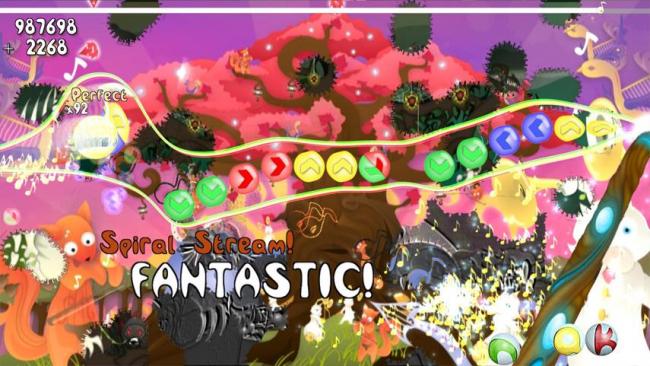
Ongaku moves from left to right, passing coloured symbols along the way that show arrows on them. As he passes over an arrow, your job is to press the corresponding direction on your keyboard, and allow the note to ring out in time with the music. Each note goes along with the beat of the current music track, so as long as you can keep a beat, this shouldn’t prove too difficult.
As you’ve probably guessed, that’s not all there is to it. Notes don’t present themselves in a straight line, and Ongaku needs to move up and down to line himself up with the incoming notes. Initially this can feel a little awkward, as the keyboard controls are a little too sensitive – however, if you jump into the options menu, it’s possible to set movement to your mouse, which makes the going far easier and more enjoyable.
As you match notes correctly, your combo will rise and the dull background will slowly behind to brighten up. Splurges of paint hit the backdrop, allowing it to burst into life. The more notes you hit, the more colour emerges, and a perfect run will provide you with a full colour display. It’s a lovely idea and gives a real sense of progression and beauty.

There are other elements that push you onwards to higher scores too. Along the way, bubbles appear with the letters ONGAKU in them, and collecting all of them grants you major points. You’re also presented with a rank at the end of each song, depending on how well you did, and achievements track how far you’ve managed to get.
While Ongaku is definitely enjoyable, it only comes with 11 songs to play through, meaning that within an hour, you’ll already have heard every track available. Fortunately, some added extras attempt to prolong the life of the game, although not all of them work so perfectly.
The Tune-a-matic takes songs off your computer, automatically attempts to put notes into them, and allows you to play through your own music. However, we found that the game was very picky about the MP3s it would read into the game, and most of the time would simply state that there was an error.
We also found that, when the game did manage to read a song, it didn’t translate it very well and the rhythm was sometimes completely off. However, while these features didn’t turn out to be so great, one other element was a blast – adding music videos. The game can take any video and use it as a background while the sound in the video plays. We found this to be far more useful and entertaining than simply the music on its own.
The Melody Maker allows you to take your own music and put the notes over the top yourself, solving our previous issue with the auto-timing. Again, there are importing issues, and while the editor is perfectly usable, we can’t say we had a great deal of fun putting the beats in.
Ongaku is far more than your average rhythm game, and if you can look past the jarring importing options, there’s plenty of charming, relaxing action to be found. If you like the sound of the game, make sure to grab a copy of the demo.
The good
The bad
More articles...
Unseen Liminality Walkthrough
By Meriel Green
Unseen Liminality is an unusual bit of Roblox horror, in that it actually got me once or twice. I’ve put some hours into this Kane Pixels’ Backrooms-themed horror title recently, and while it’s in its early stages of development, it …Best Horror Games On Itch.io – June 2026
By Adele Wilson
Across a bounty of subgenres.VV Ultimatum Spirit Alloy – Crafting Recipe Guide
By Adele Wilson
Crafting Spirit Alloys for crafting recipes.